See RavenFabric in action
Real terminal recordings from real infrastructure. Every command is E2E encrypted via Noise XX, policy-checked, and audited. The same static binary runs everywhere.
Jump to a demo
Multi-Node Ubuntu
Manage multiple Ubuntu systems remotely. Two agents connected through a relay broker — all traffic mutually authenticated and encrypted.
┌─────────────────┐     ┌─────────────────┐
│  rf-agent-1     │     │  rf-agent-2     │
│  Ubuntu 24.04   │     │  Ubuntu 24.04   │
│  token: agent1  │     │  token: agent2  │
└────────┬────────┘     └────────┬────────┘
         │ WebSocket              │ WebSocket
         │                        │
    ┌────┴────────────────────────┴────┐
    │         rf-relay                 │
    │         Ubuntu 24.04             │
    │         :9091 (host-mapped)      │
    └────────────────┬─────────────────┘
                     │ port 9091
              ┌──────┴──────┐
              │  rf CLI     │
              │  (your Mac) │
              └─────────────┘
Containers
3 (1 relay + 2 agents)
Port
9091
Image
ubuntu:24.04
Encryption
Noise XX (E2E)
Reproduce It
# Clone and build
git clone https://github.com/egkristi/RavenFabric.git
cd RavenFabric
cargo build --release -p rf-cli

# Start the demo (downloads agent/relay binaries automatically)
cd demos/multi-node-ubuntu
./setup.sh

# Execute commands on agents ($RELAY = relay host, typically the Docker host IP)
rf --relay ws://$RELAY:9091 exec --token agent1 'hostname && uname -a'
rf --relay ws://$RELAY:9091 exec --token agent2 'cat /etc/os-release | head -4'

# Teardown
./setup.sh teardown
Policy Denial
Apply a restrictive policy to see deny-by-default in action. Safe read-only commands pass; dangerous commands are blocked and audited.
# Run the policy denial scenario
./scenarios/12-policy-denial.sh

# Or do it manually — apply restrictive policy, restart agent
# Then test allowed vs denied commands:

# ALLOWED — read-only commands pass
rf --relay ws://$RELAY:9091 exec --token agent1 'hostname'
# > 4f2a1b3c9d7e

rf --relay ws://$RELAY:9091 exec --token agent1 'uname -a'
# > Linux 4f2a1b3c9d7e 6.x aarch64 GNU/Linux

# DENIED — destructive and network commands blocked
rf --relay ws://$RELAY:9091 exec --token agent1 'rm -rf /'
# > Error: command denied by policy

rf --relay ws://$RELAY:9091 exec --token agent1 'curl http://example.com'
# > Error: command denied by policy

rf --relay ws://$RELAY:9091 exec --token agent1 'apt install -y nmap'
# > Error: command denied by policy

# Every denial is recorded in the audit log
rf --relay ws://$RELAY:9091 exec --token agent1 'cat /var/log/rf-audit.jsonl | tail -3'
Audit Trail
Every action — allowed or denied — produces a structured JSON audit entry. Each agent maintains its own append-only log.
# Run the audit trail scenario
./scenarios/13-audit-trail.sh

# View the structured audit log (JSON-lines format)
docker exec rf-agent-1 tail -3 /var/log/rf-audit.jsonl
# > {"timestamp":"2026-05-09T...","command":"hostname","decision":"allowed",...}
# > {"timestamp":"2026-05-09T...","command":"uname -a","decision":"allowed",...}

# Count audit entries per agent
docker exec rf-agent-1 wc -l < /var/log/rf-audit.jsonl
# > 12
docker exec rf-agent-2 wc -l < /var/log/rf-audit.jsonl
# > 5

# Each agent has its own independent, append-only audit log
docker exec rf-agent-2 tail -1 /var/log/rf-audit.jsonl
Port Forwarding
SSH-style local port forwarding through Noise XX encrypted tunnels. Access remote services without firewall changes.
# Run the port forwarding scenario
./scenarios/14-port-forwarding.sh

# Start a web server on the remote agent
rf --relay ws://$RELAY:9091 exec --token agent1 \
  'python3 -m http.server 8000 --directory /tmp/www &'

# Forward local port to agent's web server
rf --relay ws://$RELAY:9091 forward --token agent1 \
  -L $LOCAL:8080 -R $LOCAL:8000

# Now access the agent's service locally
# curl http://$LOCAL:8080  →  tunneled to agent1:8000

# Forwarding types:
#   Local:   -L $LOCAL:8080 → agent:8000
#   Reverse: --reverse agent:9000 → you:3000
#   SOCKS5:  --socks5 $LOCAL:1080 → agent → dest
Dev Mode (Zero-Setup)
One command starts a relay + agent in a single process. No Docker, no config files, no key exchange. Perfect for local development.
# Run the dev mode scenario
./scenarios/15-dev-mode.sh

# Start dev mode (relay + agent in one process)
rf dev
# RavenFabric Dev Mode
# Relay:  $LOCAL:9090
# Token:  dev

# In another terminal, execute commands instantly
rf exec --token dev 'hostname'
rf exec --token dev --stream 'for i in 1 2 3; do echo $i; sleep 1; done'

# Custom port and bind address
rf dev --port 8080
rf dev --port 8080 --bind 0.0.0.0

# Stop with Ctrl+C — clean shutdown, no orphans
Fleet Orchestration
Execute commands across multiple agents with YAML playbooks. Supports parallel, sequential, rolling, and canary strategies with automatic rollback.
# Run the fleet orchestration scenario
./scenarios/16-fleet-orchestration.sh

# Collect inventory from all agents
for token in agent1 agent2; do
  rf --relay ws://$RELAY:9091 exec --token $token 'hostname'
done

# Run a parallel playbook (all agents at once)
rf --relay ws://$RELAY:9091 playbook --token agent1 \
  playbooks/parallel-update.yaml

# Run a canary deploy (test 1 agent, then roll out)
rf --relay ws://$RELAY:9091 playbook --token agent1 \
  playbooks/canary-deploy.yaml

# Strategies: parallel | sequential | rolling | canary
# Rollback: automatic on failure (configurable)
Human Approval for AI Agents
AI agents connect via MCP but high-risk operations require human approval. Approvals are SHA-256 bound to the exact command (no substitution), one-time-use, and expire after 30 minutes.
# Run the human approval scenario
./scenarios/17-human-approval.sh

# AI requests approval via MCP tool
# rf_request_approval(
#   command: "psql -c 'ALTER TABLE users ADD COLUMN role TEXT'"
#   reason: "Adding role column for RBAC feature"
# ) → approval_id, status: PENDING

# Operator reviews and approves/denies
# approve("a1b2c3d4-...") → APPROVED
# deny("a1b2c3d4-...")    → DENIED

# AI polls: rf_check_approval(id) → APPROVED
# AI passes approval_id to rf_exec (hash-verified, one-time-use)
rf --relay ws://$RELAY:9091 exec --token agent1 \
  'echo "Command executed after human approval"'

# Defense in depth: policy → approval (hash + TTL) → rate limit → audit
Record the Demo
# Record with asciinema (requires demo running)
asciinema rec --command "bash demos/recordings/record-multi-node.sh" \
  demos/recordings/multi-node.cast --cols 100 --rows 28 --overwrite

# Convert to animated SVG
svg-term --in demos/recordings/multi-node.cast \
  --out website/assets/demos/multi-node.svg \
  --window --width 100 --height 28 --padding 20 --no-cursor
Multi-Distro Linux
One static musl binary runs on every major Linux distribution. No runtime dependencies, no compilation, no package manager needed.
┌──────────┐ ┌──────────┐ ┌──────────┐ ┌──────────┐ ┌──────────┐
│  Ubuntu   │ │  Debian  │ │  Fedora  │ │  Rocky   │ │ Manjaro  │
│  24.04    │ │  12      │ │  41      │ │  9       │ │  (Arch)  │
└─────┬─────┘ └─────┬────┘ └─────┬────┘ └─────┬────┘ └─────┬────┘
      └──────┬──────┴─────┬──────┴──────┬──────┴─────┬──────┘
             │            │             │            │
┌──────────┐ │ ┌──────────┐ ┌──────────┐ │ ┌──────────┐
│ openSUSE │ │ │  Alpine  │ │  Amazon  │ │ │   Void   │
└─────┬────┘ │ └─────┬────┘ └─────┬────┘ │ └─────┬────┘
      └──────┴───────┴─────┬──────┴──────┴───────┘
                           │
                  ┌────────┴────────┐
                  │   rf-relay      │
                  │   :9092 (host)  │
                  └────────┬────────┘
                    ┌──────┴──────┐
                    │   rf CLI    │
                    └─────────────┘
| Distribution | Image | Package Manager | libc | Token |
|---|---|---|---|---|
| Ubuntu 24.04 | ubuntu:24.04 | apt (deb) | glibc | ubuntu |
| Debian 12 | debian:12-slim | apt (deb) | glibc | debian |
| Fedora 41 | fedora:41 | dnf (rpm) | glibc | fedora |
| Rocky Linux 9 | rockylinux:9 | dnf (rpm) | glibc | rocky |
| Manjaro | manjarolinux/base | pacman | glibc | manjaro |
| openSUSE | opensuse/tumbleweed | zypper (rpm) | glibc | opensuse |
| Alpine 3.20 | alpine:3.20 | apk | musl | alpine |
| Amazon Linux 2023 | amazonlinux:2023 | dnf (rpm) | glibc | amazon |
| Void Linux | void-glibc-full | xbps | glibc | void |
Reproduce It
# Clone and build
git clone https://github.com/egkristi/RavenFabric.git
cd RavenFabric
cargo build --release -p rf-cli

# Start all 9 distro containers + relay
cd demos/multi-distro-linux
./setup.sh

# Query any distro ($RELAY = relay host, set by setup.sh)
rf --relay ws://$RELAY:9092 exec --token ubuntu 'cat /etc/os-release | head -2'
rf --relay ws://$RELAY:9092 exec --token alpine 'cat /etc/os-release | head -2'
rf --relay ws://$RELAY:9092 exec --token fedora 'cat /etc/os-release | head -2'

# Verify all agents respond
./setup.sh verify

# Teardown
./setup.sh teardown
Policy Denial
Same deny-by-default engine works identically on glibc (Ubuntu) and musl (Alpine). Package managers, network tools, and destructive commands are all blocked.
# Run the policy denial scenario
./scenarios/policy-denial.sh

# ALLOWED — read-only commands on Ubuntu (glibc)
rf --relay ws://$RELAY:9092 exec --token ubuntu 'hostname'
# > rf-ubuntu

# DENIED — apt blocked on Ubuntu
rf --relay ws://$RELAY:9092 exec --token ubuntu 'apt install -y nmap'
# > Error: command denied by policy

# ALLOWED — same policy on Alpine (musl-native)
rf --relay ws://$RELAY:9092 exec --token alpine 'hostname'
# > rf-alpine

# DENIED — apk blocked on Alpine
rf --relay ws://$RELAY:9092 exec --token alpine 'apk add nmap'
# > Error: command denied by policy
Audit Trail
Identical structured audit logging across all 9 Linux distributions. Same JSON format regardless of glibc vs musl, apt vs dnf vs apk.
# Run the audit trail scenario
./scenarios/audit-trail.sh

# View audit log on Ubuntu (glibc, apt-based)
docker exec rf-ubuntu tail -2 /var/log/rf-audit.jsonl
# > {"timestamp":"...","command":"hostname","decision":"allowed",...}

# View audit log on Alpine (musl-native, apk-based)
docker exec rf-alpine tail -2 /var/log/rf-audit.jsonl
# > {"timestamp":"...","command":"hostname","decision":"allowed",...}

# Count entries across distros
for d in ubuntu alpine fedora rocky debian; do
  echo "$d: $(docker exec rf-$d wc -l < /var/log/rf-audit.jsonl)"
done
Port Forwarding
Same forwarding mechanism works across all distributions. Tunnel to web servers on Ubuntu, Alpine, or Fedora agents through encrypted channels.
# Run the port forwarding scenario
./scenarios/port-forwarding.sh

# Forward to Ubuntu agent's web server
rf --relay ws://$RELAY:9092 forward --token ubuntu \
  -L $LOCAL:8080 -R $LOCAL:8000

# Forward to Alpine agent (musl-native)
rf --relay ws://$RELAY:9092 forward --token alpine \
  -L $LOCAL:8081 -R $LOCAL:8000

# Forward to Fedora agent (rpm-based)
rf --relay ws://$RELAY:9092 forward --token fedora \
  -L $LOCAL:8082 -R $LOCAL:8000

# All tunnels are encrypted end-to-end, regardless of distro
Dev Mode (Zero-Setup)
Same statically-linked binary, same dev mode, works on every distro. No package manager needed — just copy the rf binary and run.
# Run the dev mode scenario
./scenarios/dev-mode.sh

# Works identically on any Linux distribution
# Ubuntu (glibc):   rf dev → ready
# Alpine (musl):    rf dev → ready
# Fedora (rpm):     rf dev → ready

# Zero dependencies — static binary, no libraries to install
rf dev
rf exec --token dev 'hostname && uname -r'

# Dev mode: ~5 MB memory, < 1 second startup
# Docker demo: ~500 MB, 30-60 seconds startup
Fleet Orchestration
One playbook deploys across all distributions. No per-distro agent packages — the static binary and orchestration engine work identically on glibc, musl, rpm, or deb.
# Run the fleet orchestration scenario
./scenarios/fleet-orchestration.sh

# Fleet inventory across distros
for distro in ubuntu alpine fedora debian rocky; do
  rf --relay ws://$RELAY:9092 exec --token $distro 'hostname && uname -r'
done

# Deploy to all distros in parallel
for distro in ubuntu alpine fedora; do
  rf --relay ws://$RELAY:9092 exec --token $distro \
    'mkdir -p /opt/app && echo v2.0 > /opt/app/version.txt'
done

# Same playbook, any distro — no apt vs dnf differences
Human Approval for AI Agents
Same MCP server binary, same approval gate on every distro. AI agents get identical human-in-the-loop protection regardless of glibc, musl, or package manager.
# Run the human approval scenario
./scenarios/human-approval.sh

# MCP server is a static binary — works on any distro
# Ubuntu (glibc):  rf-mcp-server → approval gate
# Alpine (musl):   rf-mcp-server → approval gate
# Fedora (rpm):    rf-mcp-server → approval gate

# RBAC: different AI agents get different permissions
# --callers config.toml maps tokens to policy profiles
# Rate limiting: 60 req/min per session (configurable)
Record the Demo
asciinema rec --command "bash demos/recordings/record-multi-distro.sh" \
  demos/recordings/multi-distro.cast --cols 100 --rows 28 --overwrite

svg-term --in demos/recordings/multi-distro.cast \
  --out website/assets/demos/multi-distro.svg \
  --window --width 100 --height 28 --padding 20 --no-cursor
Kubernetes + CloudNativePG
Access a CloudNativePG PostgreSQL cluster through an encrypted tunnel. The agent runs as a Kubernetes Deployment with database credentials auto-injected from CNPG secrets.
              ┌─── Kubernetes ───────────────────────────┐
              │  namespace: ravenfabric                  │
              │                                          │
              │  ┌──────────────┐   ┌─────────────────┐  │
              │  │ CNPG Cluster │   │   rf-agent      │  │
              │  │              │◄──│   Deployment    │  │
              │  │ pg-cluster-1 │   │                 │  │
              │  │ (primary)    │   │ postgres:17     │  │
              │  │              │   │ + rf-agent      │  │
              │  │ pg-cluster-2 │   │                 │  │
              │  │ (replica)    │   │ Token: cnpg     │  │
              │  └──────────────┘   └────────┬────────┘  │
              │      ▲ pg-cluster-rw         │ ws://     │
              └──────┼───────────────────────┼───────────┘
                     │          ┌─────────────▼──────────┐
                     │          │  rf-relay (Docker)     │
                     │          │  :9093 (host)          │
                     │          └─────────────┬──────────┘
                     │                        │
                     │          ┌─────────────▼──────────┐
                     │          │     rf CLI (your Mac)  │
                     │          └────────────────────────┘
| Resource | Type | Description |
|---|---|---|
| rf-relay | Docker container | Relay broker (Ubuntu 24.04, port 9093) |
| ravenfabric | K8s Namespace | Isolated namespace for demo resources |
| pg-cluster | CNPG Cluster | 2-instance PostgreSQL (primary + replica) |
| pg-cluster-rw | K8s Service | Read-write endpoint (connects to primary) |
| rf-agent | K8s Deployment | RavenFabric agent with psql client |
| rf-agent-policy | K8s ConfigMap | Policy allowing all commands (demo-only) |
Reproduce It
# Install CNPG operator (if not already installed)
helm repo add cnpg https://cloudnative-pg.github.io/charts
helm upgrade --install cnpg-operator cnpg/cloudnative-pg \
    --namespace cnpg-system --create-namespace --wait

# Deploy everything (relay + CNPG cluster + rf-agent)
cd demos/kubernetes-cnpg
./setup.sh

# Query PostgreSQL through the encrypted tunnel ($RELAY = K8s node IP)
rf --relay ws://$RELAY:9093 exec --token cnpg 'psql -c "SELECT version();"'

# Check replication
rf --relay ws://$RELAY:9093 exec --token cnpg \
  'psql -c "SELECT client_addr, state FROM pg_stat_replication;"'

# Teardown
./setup.sh teardown
Policy Denial
Restrict the agent to read-only SQL queries. SELECT passes; DROP, DELETE, and system commands are blocked. Policy is stored as a Kubernetes ConfigMap.
# Run the policy denial scenario
./scenarios/policy-denial.sh

# ALLOWED — SELECT queries pass
rf --relay ws://$RELAY:9093 exec --token cnpg 'psql -c "SELECT version();"'
# > PostgreSQL 17.x on aarch64-unknown-linux-gnu

# DENIED — DROP TABLE blocked by policy
rf --relay ws://$RELAY:9093 exec --token cnpg 'psql -c "DROP TABLE demo;"'
# > Error: command denied by policy

# DENIED — curl blocked
rf --relay ws://$RELAY:9093 exec --token cnpg 'curl http://example.com'
# > Error: command denied by policy

# Audit log shows every denial
rf --relay ws://$RELAY:9093 exec --token cnpg 'cat /tmp/rf-audit.jsonl | tail -3'
Audit Trail
Every SQL query and system command executed through the tunnel is audited. Accessible via RavenFabric or kubectl.
# Run the audit trail scenario
./scenarios/audit-trail.sh

# View audit log via the encrypted tunnel
rf --relay ws://$RELAY:9093 exec --token cnpg 'tail -3 /tmp/rf-audit.jsonl'
# > {"timestamp":"...","command":"psql -c \"SELECT version();\"","decision":"allowed",...}

# Or view directly via kubectl
kubectl exec -n ravenfabric deploy/rf-agent -c rf-agent -- tail -3 /tmp/rf-audit.jsonl

# Count total audited actions
rf --relay ws://$RELAY:9093 exec --token cnpg 'wc -l < /tmp/rf-audit.jsonl'
Port Forwarding
Forward PostgreSQL ports through encrypted tunnels. Access the database directly from your Mac — no kubectl, no kubeconfig, works through NAT.
# Run the port forwarding scenario
./scenarios/port-forwarding.sh

# Forward local port to PostgreSQL (read-write primary)
rf --relay ws://$RELAY:9093 forward --token cnpg \
  -L $LOCAL:5432 -R pg-cluster-rw:5432

# Then connect directly with psql from your Mac
# psql -h $LOCAL -p 5432 -U postgres -d app

# Forward to read-only replica for reporting
rf --relay ws://$RELAY:9093 forward --token cnpg \
  -L $LOCAL:5433 -R pg-cluster-ro:5432

# vs kubectl: works through NAT, E2E encrypted, audited
Dev Mode (Zero-Setup)
Prototype rf commands locally before deploying to Kubernetes. Same syntax works in dev mode and against a real cluster.
# Run the dev mode scenario
./scenarios/dev-mode.sh

# Prototype locally — no cluster required
rf dev
rf exec --token dev 'echo "SELECT 1" | psql ...'

# Same command against real K8s — just change relay + token
# rf --relay ws://relay.example.com exec --token cnpg 'psql ...'

# Workflow: dev mode → prototype → deploy to K8s
# 1. rf dev                      (instant local env)
# 2. rf exec --token dev '...'   (test commands)
# 3. Deploy to K8s + real relay   (production)
Fleet Orchestration
Coordinate database operations across pods with playbooks. Canary deploys, rolling maintenance, and automatic rollback — without kubectl scripting.
# Run the fleet orchestration scenario
./scenarios/fleet-orchestration.sh

# Database health check via playbook
rf --relay ws://$RELAY:9093 exec --token cnpg \
  'PGPASSWORD=$POSTGRES_PASSWORD psql -h pg-cluster-rw \
   -U postgres -d app -c "SELECT version();"'

# Coordinated maintenance (sequential strategy)
# command: "psql ... -c 'VACUUM ANALYZE;'"
# strategy: sequential
# on_failure: stop_only

# vs kubectl: built-in canary, rollback, audit trail
# Works through NAT — no kubeconfig required
Human Approval for AI Agents
AI DBA assistant can SELECT freely, but schema changes and destructive operations require human approval. Webhook integration with Slack, PagerDuty, or GitOps.
# Run the human approval scenario
./scenarios/human-approval.sh

# AI requests approval for a schema migration
# rf_request_approval(
#   command: "psql -c 'ALTER TABLE users ADD COLUMN role TEXT'"
#   reason: "RBAC feature, ticket DB-1234"
# )

# Operator approves via dashboard / Slack / webhook
# AI executes the approved migration
rf --relay ws://$RELAY:9093 exec --token cnpg \
  'PGPASSWORD=$POSTGRES_PASSWORD psql -h pg-cluster-rw \
   -U postgres -d app -c "ALTER TABLE users ADD COLUMN role TEXT"'

# vs kubectl: no human gate, no per-command audit, no rate limit
Record the Demo
asciinema rec --command "bash demos/recordings/record-k8s-cnpg.sh" \
  demos/recordings/k8s-cnpg.cast --cols 100 --rows 28 --overwrite

svg-term --in demos/recordings/k8s-cnpg.cast \
  --out website/assets/demos/k8s-cnpg.svg \
  --window --width 100 --height 28 --padding 20 --no-cursor
Transport Showcase
Five transport types — WebSocket (TCP), QUIC (UDP), UNIX socket, stdio pipe, and in-process memory — all running identical Noise XX encrypted sessions. Same protocol, same policy, same audit trail regardless of transport.
┌────────────────────────────────────────────────────┐
│  Same Noise XX session over 5 transports:          │
│                                                    │
│  1. WebSocket (TCP)    ws://relay:9090             │
│  2. QUIC (UDP)         quic://relay:9443           │
│  3. UNIX socket        /tmp/rf.sock                │
│  4. Stdio pipe         rf-agent | rf-cli           │
│  5. In-process memory  tokio::io::duplex           │
│                                                    │
│  All produce identical: ciphertext, audit, policy  │
└────────────────────────────────────────────────────┘
Transports
5 (WS, QUIC, UNIX, stdio, memory)
Encryption
Noise XX on all
Scenarios
6
Key Point
Transport is interchangeable
| Transport | Protocol | Latency | Use Case |
|---|---|---|---|
| WebSocket | TCP | ~1 ms | Default relay, works through proxies/CDNs |
| QUIC | UDP | ~0.5 ms | Multiplexed streams, 0-RTT, mobile-friendly |
| UNIX Socket | IPC | ~0.1 ms | Same-host sidecar, container-to-container |
| Stdio Pipe | Process | ~0.05 ms | MCP server, subprocess isolation |
| Memory | In-process | ~0.01 ms | Testing, dev mode, embedded |
Reproduce It
# Build
git clone https://github.com/egkristi/RavenFabric.git
cd RavenFabric
cargo build --release -p rf-cli -p rf-agent -p rf-relay

# Run all 5 transports in sequence
cd demos/transport-showcase
./scenarios/06-all-transports.sh

# Or run individual transports
./scenarios/01-websocket.sh     # WebSocket over TCP
./scenarios/02-quic.sh          # QUIC over UDP (0-RTT)
./scenarios/03-unix-socket.sh   # UNIX domain socket
./scenarios/04-stdio-pipe.sh    # Parent/child stdin/stdout
./scenarios/05-memory.sh        # In-process duplex channel
Record the Demo
# Record with asciinema
asciinema rec --command "bash demos/recordings/record-transport-showcase.sh" \
  demos/recordings/transport-showcase.cast --cols 100 --rows 28 --overwrite

# Convert to animated SVG
svg-term --in demos/recordings/transport-showcase.cast \
  --out website/assets/demos/transport-showcase.svg \
  --window --width 100 --height 28 --padding 20 --no-cursor
Desired-State Convergence
Declarative desired-state engine with drift detection and auto-remediation. Define what should be true. RavenFabric converges reality to match — and reports what changed.
desired-state.yaml
  ├── packages: [nginx, curl]      → install if missing
  ├── files:                       → create/fix content + permissions
  │     /etc/app/config.yaml
  ├── services: [nginx]            → ensure running + enabled
  └── sysctl:                      → apply kernel params
        net.ipv4.ip_forward: 1

Convergence Engine:
  check → drift report → remediate → re-check → converged
Resources
Packages, files, services, sysctl
Modes
Check-only or auto-remediate
Scenarios
7
Targeting
Grains-based label selectors
| Scenario | Script | What It Shows |
|---|---|---|
| Drift Detection | 01-drift-detection.sh | Report drift without making changes |
| Auto-Remediation | 02-remediation.sh | Fix drifted resources automatically |
| Report-Only Mode | 03-report-mode.sh | Monitoring mode — detect but don't change |
| Grains Targeting | 04-grains-targeting.sh | Target agents by OS, arch, or role labels |
| Event Triggers | 05-event-triggers.sh | Cron, file watch, timer, webhook triggers |
| Version Constraints | 06-version-constraints.sh | Package version range enforcement |
| All Scenarios | 07-all-scenarios.sh | Run all scenarios in sequence |
Reproduce It
# Build
git clone https://github.com/egkristi/RavenFabric.git
cd RavenFabric
cargo build --release -p rf-cli

cd demos/desired-state

# Detect drift without changing anything
./scenarios/01-drift-detection.sh

# Auto-fix drifted resources
./scenarios/02-remediation.sh

# Target specific agents by grains (OS, arch, role)
./scenarios/04-grains-targeting.sh

# Run all 7 scenarios
./scenarios/07-all-scenarios.sh
Example Spec
# desired-state.yaml — declare target state
resources:
  packages:
    - name: nginx
      state: installed
      version: ">= 1.24.0"
    - name: curl
      state: installed
  files:
    - path: /etc/app/config.yaml
      content: |
        server:
          port: 8080
          workers: 4
      mode: "0644"
  services:
    - name: nginx
      state: running
      enabled: true
  sysctl:
    - key: net.ipv4.ip_forward
      value: "1"

# Grains selector (optional — target specific agents)
grains:
  os_family: debian
  role: webserver
Record the Demo
asciinema rec --command "bash demos/recordings/record-desired-state.sh" \
  demos/recordings/desired-state.cast --cols 100 --rows 28 --overwrite

svg-term --in demos/recordings/desired-state.cast \
  --out website/assets/demos/desired-state.svg \
  --window --width 100 --height 28 --padding 20 --no-cursor
Data Collection
Fleet-wide inventory, resource monitoring, log collection, config audit, network topology, and security scanning — 3 role-based agents with strict read-only policy.
┌──────────────┐  ┌──────────────┐  ┌──────────────┐
│  collector   │  │  webserver   │  │  database    │
│  (metrics)   │  │  (nginx)     │  │  (postgres)  │
└──────┬───────┘  └──────┬───────┘  └──────┬───────┘
       │ WebSocket        │ WebSocket        │ WebSocket
       └─────────┬────────┴──────────────────┘
            ┌────┴─────────┐
            │   rf-relay   │
            │   :9096      │
            └──────────────┘

Policy: read-only (no writes, no mutations)
Agents
3 (collector, webserver, database)
Port
9096
Scenarios
8
Policy
Read-only, no mutations
| Scenario | Script | What It Collects |
|---|---|---|
| System Inventory | 01-system-inventory.sh | CPU, memory, disk, OS, kernel version |
| Resource Monitoring | 02-resource-monitoring.sh | Live CPU/memory/disk usage per agent |
| Log Collection | 03-log-collection.sh | Application and system log aggregation |
| Config Audit | 04-config-audit.sh | Configuration file comparison and drift |
| Network Topology | 05-network-topology.sh | Interfaces, routes, listening ports |
| Security Scan | 06-security-scan.sh | SUID binaries, world-writable dirs, SSH config |
| Fleet Snapshot | 07-fleet-snapshot.sh | Full fleet inventory in one pass |
| Policy Boundary | 08-policy-boundary.sh | Verify writes are blocked by read-only policy |
Reproduce It
# Build and start
git clone https://github.com/egkristi/RavenFabric.git
cd RavenFabric
cargo build --release -p rf-cli

cd demos/data-collection
./setup.sh

# System inventory (CPU, memory, disk, OS)
./scenarios/01-system-inventory.sh

# Live resource monitoring
./scenarios/02-resource-monitoring.sh

# Security scan across the fleet
./scenarios/06-security-scan.sh

# Fleet-wide snapshot
./scenarios/07-fleet-snapshot.sh

# Verify policy boundary (writes blocked)
./scenarios/08-policy-boundary.sh

# Teardown
./setup.sh teardown
Record the Demo
asciinema rec --command "bash demos/recordings/record-data-collection.sh" \
  demos/recordings/data-collection.cast --cols 100 --rows 28 --overwrite

svg-term --in demos/recordings/data-collection.cast \
  --out website/assets/demos/data-collection.svg \
  --window --width 100 --height 28 --padding 20 --no-cursor
MCP / AI Agent Integration
End-to-end MCP server demo with policy-bounded AI execution, human approval workflow, and full audit trail. AI agents can only do what policy explicitly permits — and sensitive operations require human sign-off.
┌────────────────┐     ┌───────────────────┐
│  AI Agent      │────►│  rf-mcp-server    │
│  (Claude, etc) │ MCP │  policy: read-only│
│                │     │  + approval gate  │
└────────────────┘     └────────┬──────────┘
                                │
                       ┌────────┴──────────┐
                       │  Policy Engine    │
                       │  deny-by-default  │
                       │  + audit log      │
                       └───────────────────┘
Components
1 MCP server + policy engine
MCP Tools
8 (exec, policy, files, approval, audit)
Scenarios
6
Approval
SHA-256 bound, one-time, 30m TTL
| MCP Tool | Description | Approval Required |
|---|---|---|
rf_exec | Execute command (policy-checked) | Optional (per policy) |
rf_query_policy | Dry-run: check if command is allowed | No |
rf_file_read | Read file (path-policy enforced) | No |
rf_file_write | Write file | Yes (configurable) |
rf_list_capabilities | Discover what AI is allowed to do | No |
rf_audit_query | Query audit log | No |
rf_request_approval | Request human approval | N/A (initiates) |
rf_check_approval | Poll approval status | No |
| Scenario | Script | What It Shows |
|---|---|---|
| Policy Discovery | 01-policy-discovery.sh | AI discovers what commands are allowed |
| Safe Execution | 02-safe-execution.sh | AI executes a policy-approved command |
| Policy Denial | 03-policy-denial.sh | AI tries dangerous command — blocked |
| Human Approval | 04-human-approval.sh | Operator approve/deny workflow |
| Audit Trail | 05-audit-trail.sh | Full audit log of all AI actions |
| File Operations | 06-file-operations.sh | Read/write with path-policy enforcement |
Reproduce It
# Build
git clone https://github.com/egkristi/RavenFabric.git
cd RavenFabric
cargo build --release -p rf-mcp-server -p rf-cli

cd demos/mcp-agent
./setup.sh

# AI discovers what policy allows
./scenarios/01-policy-discovery.sh

# AI executes an allowed command
./scenarios/02-safe-execution.sh

# AI tries a denied command — blocked
./scenarios/03-policy-denial.sh

# Human approval workflow (request → approve → execute)
./scenarios/04-human-approval.sh

# Full audit trail of AI actions
./scenarios/05-audit-trail.sh

# File operations with path-policy
./scenarios/06-file-operations.sh

./setup.sh teardown
Claude Desktop Integration
# claude_desktop_config.json — add MCP server
{
  "mcpServers": {
    "ravenfabric": {
      "command": "rf-mcp-server",
      "args": [
        "--policy", "policy.yaml",
        "--require-approval",
        "--approval-pattern", "^(rm|apt|pip|psql).*"
      ]
    }
  }
}
Record the Demo
asciinema rec --command "bash demos/recordings/record-mcp-agent.sh" \
  demos/recordings/mcp-agent.cast --cols 100 --rows 28 --overwrite

svg-term --in demos/recordings/mcp-agent.cast \
  --out website/assets/demos/mcp-agent.svg \
  --window --width 100 --height 28 --padding 20 --no-cursor
Resilience
Agent reconnect after relay restart, network partition recovery, graceful degradation, and exponential backoff visualization. The fabric self-heals.
┌───────────┐  ┌───────────┐  ┌───────────┐
│  agent-1  │  │  agent-2  │  │  agent-3  │
│  (web01)  │  │  (db01)   │  │  (web02)  │
└─────┬─────┘  └─────┬─────┘  └─────┬─────┘
      │               │               │
      └───────┬───────┴───────┬───────┘
         ┌────┴────┐     ┌────┴────┐
         │ relay   │ ──► │ relay   │
         │ (down)  │     │ (back)  │
         └─────────┘     └─────────┘
              ↕
     backoff: 1s→2s→4s→8s→16s→30s (cap)
Containers
4 (1 relay + 3 agents)
Port
9094
Scenarios
5
Key Point
Self-healing reconnect
| Scenario | Script | What It Tests |
|---|---|---|
| Agent Reconnect | 01-agent-reconnect.sh | Kill agent, verify auto-restart and reconnect |
| Relay Restart | 02-relay-restart.sh | Stop relay, all agents queue then recover |
| Network Partition | 03-network-partition.sh | Isolate agent, verify recovery on reconnect |
| Graceful Degradation | 04-graceful-degradation.sh | One agent down, others continue normally |
| Backoff Behavior | 05-backoff-behavior.sh | Exponential backoff: 1s → 2s → 4s → 30s cap |
Reproduce It
# Build and start
git clone https://github.com/egkristi/RavenFabric.git
cd RavenFabric
cargo build --release -p rf-cli

cd demos/resilience
./setup.sh

# Kill and restart an agent — it reconnects
./scenarios/01-agent-reconnect.sh

# Stop the relay — agents queue, relay restarts — agents recover
./scenarios/02-relay-restart.sh

# Simulate network partition
./scenarios/03-network-partition.sh

# One agent down, others keep working
./scenarios/04-graceful-degradation.sh

# Watch exponential backoff in action
./scenarios/05-backoff-behavior.sh

# Teardown
./setup.sh teardown
Record the Demo
asciinema rec --command "bash demos/recordings/record-resilience.sh" \
  demos/recordings/resilience.cast --cols 100 --rows 28 --overwrite

svg-term --in demos/recordings/resilience.cast \
  --out website/assets/demos/resilience.svg \
  --window --width 100 --height 28 --padding 20 --no-cursor
Controller / Web UI
HTTP API server with fleet dashboard and real-time agent monitoring. REST endpoints for agent list, health check, remote execution, and policy inspection.
                 ┌───────────────────────┐
   Browser ────► │  Controller (HTTP)    │ ◄──── rf CLI
                 │  port 8080            │
                 │  ┌─────────────────┐  │
                 │  │ Embedded Web UI │  │
                 │  │ (dashboard)     │  │
                 │  └─────────────────┘  │
                 └──────────┬────────────┘
                            │ WebSocket
                    ┌───────┼───────┐
                    │       │       │
              ┌─────┴┐  ┌──┴──┐  ┌─┴─────┐
              │ ag-1 │  │ag-2 │  │  CLI  │
              └──────┘  └─────┘  └───────┘
Containers
3 (1 controller + 2 agents)
Ports
9095 (relay), 8080 (HTTP)
Scenarios
5
Key Point
REST API + embedded dashboard
| Endpoint | Method | Description |
|---|---|---|
/ | GET | Embedded web dashboard (real-time metrics) |
/api/agents | GET | List connected agents with status and uptime |
/api/health | GET | Controller and agent health check |
/api/exec | POST | Execute command on a specific agent |
/api/policy | GET | Inspect current policy configuration |
| Scenario | Script | What It Shows |
|---|---|---|
| Agent List | 01-agent-list.sh | Query connected fleet via REST |
| Health Check | 02-health-check.sh | Controller + agent health status |
| Remote Execution | 03-remote-execution.sh | Execute commands via HTTP API |
| Fleet Dashboard | 04-fleet-dashboard.sh | Open embedded web UI |
| Policy View | 05-policy-view.sh | Inspect policy via API |
Reproduce It
# Build and start
git clone https://github.com/egkristi/RavenFabric.git
cd RavenFabric
cargo build --release -p rf-cli

cd demos/controller
./setup.sh

# List connected agents via REST API
curl -s http://$HOST:8080/api/agents | python3 -m json.tool

# Health check
curl -s http://$HOST:8080/api/health | python3 -m json.tool

# Execute command via HTTP API
curl -s -X POST http://$HOST:8080/api/exec \
  -d '{"agent":"agent-1","cmd":"uptime"}'

# View policy
curl -s http://$HOST:8080/api/policy | python3 -m json.tool

# Open dashboard in browser
# http://$HOST:8080

# Run all scenarios
./scenarios/01-agent-list.sh
./scenarios/02-health-check.sh
./scenarios/03-remote-execution.sh
./scenarios/04-fleet-dashboard.sh
./scenarios/05-policy-view.sh

# Teardown
./setup.sh teardown
Record the Demo
asciinema rec --command "bash demos/recordings/record-controller.sh" \
  demos/recordings/controller.cast --cols 100 --rows 28 --overwrite

svg-term --in demos/recordings/controller.cast \
  --out website/assets/demos/controller.svg \
  --window --width 100 --height 28 --padding 20 --no-cursor
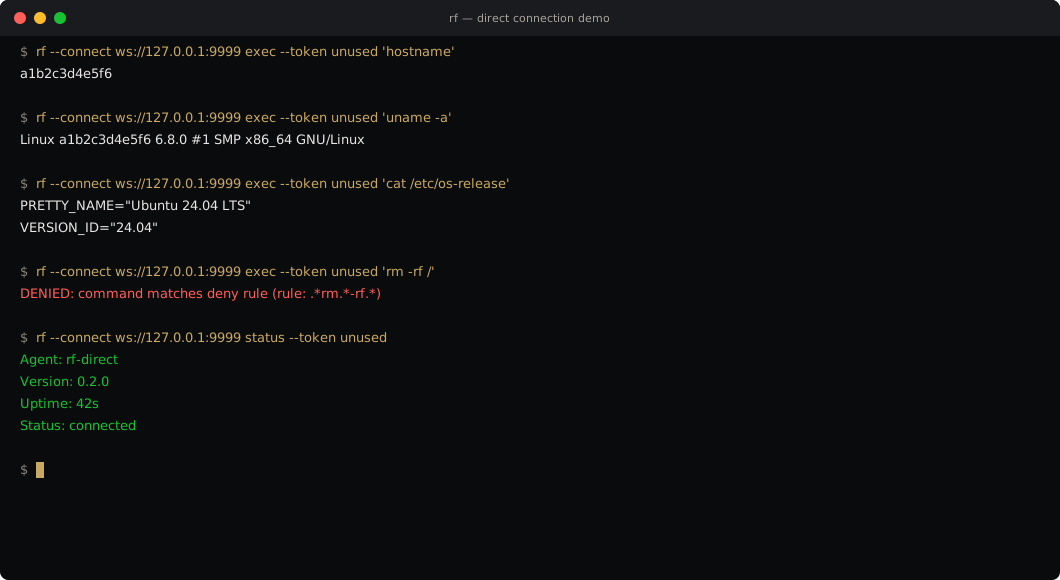
Direct Connection
Connect to an agent directly — no relay, no meet token. The agent listens on a port (like sshd) and the CLI connects straight to it. Same Noise XX encryption, same policy enforcement, zero intermediaries.
┌──────────────────────┐
│  rf-agent             │
│  Ubuntu 24.04         │
│  --listen 0.0.0.0:9999│
│  :9999 (host-mapped)  │
└──────────┬────────────┘
           │ WebSocket (Noise XX)
           │ port 9999
    ┌──────┴──────┐
    │  rf CLI     │
    │  (your Mac) │
    │  --connect  │
    └─────────────┘
Topology
Point-to-point. CLI connects directly to the agent — no relay broker involved.
Use case
LAN, lab environments, SSH replacement. Any scenario where the agent is reachable.
Security
Same Noise XX mutual authentication and policy enforcement as relay mode.
Firewall
Agent needs an inbound port open (vs. relay mode where only outbound is needed).
| Scenario | Script | What It Shows |
|---|---|---|
| Direct Exec | 01-direct-exec.sh | Execute commands without relay |
| System Info | 02-system-info.sh | Collect host information |
| Policy Denial | 03-policy-denial.sh | Verify deny-by-default blocks dangerous commands |
| Audit Trail | 04-audit-trail.sh | Inspect structured audit log |
Reproduce It
# Build the CLI
git clone https://github.com/egkristi/RavenFabric.git
cd RavenFabric
cargo build --release -p rf-cli

# Start the agent in direct-listen mode
cd demos/direct-connection
./setup.sh

# Execute commands directly (no relay needed)
rf --connect ws://$HOST:9999 exec --token unused 'hostname'
rf --connect ws://$HOST:9999 exec --token unused 'uname -a'

# Policy denial — dangerous commands are blocked
rf --connect ws://$HOST:9999 exec --token unused 'rm -rf /'

# Agent status
rf --connect ws://$HOST:9999 status --token unused

# Teardown
./setup.sh teardown
What happens when you run a command
1. Connect
CLI connects via relay (meet token pairing) or directly to the agent (like SSH). Both paths use WebSocket.
2. Handshake
Noise XX mutual authentication. Both CLI and agent prove their identity with static keys.
3. Policy check
The agent checks the command against its local deny-by-default policy. No match = denied.
4. Execute
Command runs with timeout and output limits. Result is encrypted and sent back through the same channel.
5. Audit
Every action (allowed or denied) produces a structured JSON audit entry. Append-only.
6. Reconnect
In relay mode, the agent reconnects with exponential backoff. In direct mode, the agent keeps listening for new connections.